Search This Blog

Monday, April 29, 2013

Compress media to save space in PowerPoint!


1. Note your file size (File, Info, Properties)
2. If in Compatibility Mode, Convert
3. If there is video or audio, Compress Media to Low Quality
4. Click a picture to activate Picture Tools tab
5. Click Compress Pictures
6. Deselect Apply only to this picture. Select E-Mail (96 ppi). Click OK
7. Click Save
8. See how much you compressed!


Thursday, April 25, 2013

Wednesday, April 24, 2013

Make Windows 7 Interface Larger

If you don't want to use reading glasses to see the Windows 7 screen, watch this short tutorial on how to increase the size of fonts, icons and gadgets!

Windows 7 Interface Overview Tutorial

Tuesday, April 23, 2013

Time Management - Quadrants of Effectiveness

Do you live in crisis mode? Learn to manage your time.  Managing your time means managing your life!  Here are tips how!


Time Management - Quadrants of Effectiveness Tutorial

Monday, April 22, 2013

Outlook 2010 - Email Views

So many emails! So few views! See how to look at your inbox differently to manage it better!

Outlook 2010 - Email Views Tutorial

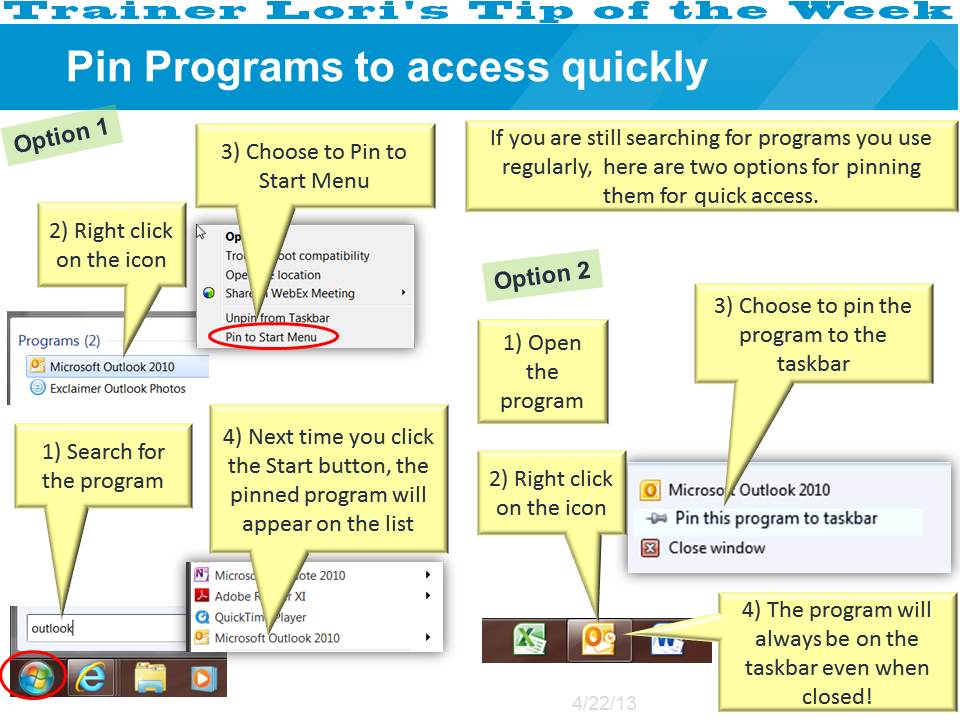
Pin programs to access quickly in Windows 7


If you are still searching for programs you use regularly in Windows 7,  here are two options for pinning them for quick access.
 
Option 1
1) Search for the program
2) Right click on the icon in Start Menu
3) Choose to Pin to Start Menu
4) Next time you click the Start button, the pinned program will appear on the list!
 
Option 2
1) Open the program
2) Right click on the icon
3) Choose to pin the program to the taskbar
4) The program will always be on the taskbar even when closed!